


If you’re a content marketer, you know the drill: research, write, edit, post, track, repeat — usually with way too many tabs open. Your browser should help you get more done, not slow you down. That’s where Chrome extensions come in.
The right ones turn repetitive tasks into one-click shortcuts and cut down on the constant tab-switching that wrecks your focus. The problem? With hundreds of thousands of options in the Chrome Web Store, many of them aren’t worth your time.
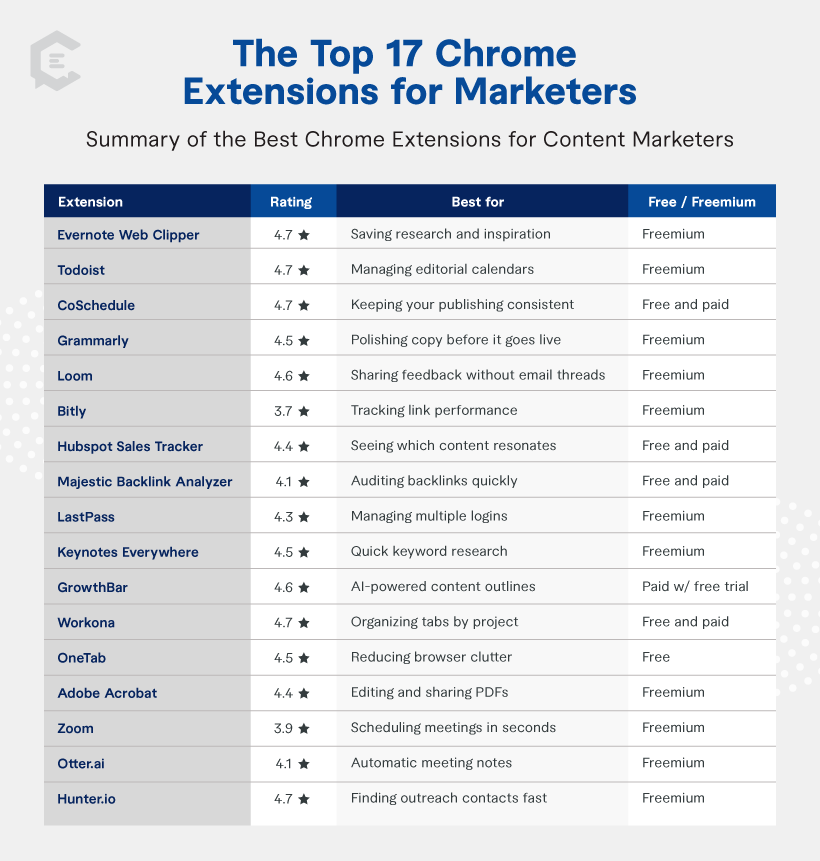
That’s why we narrowed it down to 17 must-have Chrome extensions for marketers that help you work faster and create better content. We vetted each one to ensure it’s active, well-rated (3.7 stars or higher), and genuinely valuable for the day-to-day work of content marketing.
1. Evernote Web Clipper — 4.7 stars
Best for: Saving research and inspiration without losing track
As a content marketer, you’re always stumbling across ideas worth saving: articles, images, even full web pages. Evernote Web Clipper lets you capture them in one click and organize everything with tags, highlights, and AI-assisted notes. It’s your digital swipe file, keeping research and inspiration close at hand whenever you need it.
2. Todoist — 4.7 stars
Best for: Managing editorial calendars and marketing to-dos
Content marketing never happens in a straight line. You’ve got campaigns, deadlines, and a dozen side tasks competing for attention. Todoist keeps it all organized with color-coded lists, reminders, and AI-powered scheduling so you never miss a beat. It’s your all-in-one task manager for staying on top of projects across every device.
3. CoSchedule — 4.7 stars
Best for: Keeping your publishing schedule consistent
Staying consistent with content is one of the hardest parts of marketing. The CoSchedule extension lets you drop posts straight into your content calendar, shuffle your schedule when plans change, and even test headlines with AI insights. It’s a simple way to keep campaigns on track and content flowing smoothly from your browser.
4. Grammarly — 4.5 stars
Best for: Polishing copy before it goes live
Nothing kills credibility faster than sloppy writing. Grammarly’s extension goes way beyond spellcheck, giving you AI-powered tone adjustments, clarity improvements, and consistency checks. Whether it’s a blog post, ad copy, or a quick social update, Grammarly helps you make sure everything you publish is clear, professional, and ready to impress.
5. Loom — 4.6 stars
Best for: Explaining ideas faster than email ever could
Explaining feedback over email often creates more confusion than clarity. Loom lets you record quick videos and screen shares to walk teammates through your ideas, then share a link instantly. It even generates AI-powered transcripts and summaries, so everyone stays aligned. It’s perfect for async collaboration, creative direction, and faster feedback on drafts.
6. Bitly — 3.7 stars
Best for: Tracking link performance
Links are the backbone of every campaign, but long, messy URLs don’t inspire clicks. With Bitly, you can shorten and brand links in one click and track how they perform across channels. It’s an easy way to clean up your content and get quick insights into what’s driving engagement.
7. HubSpot Sales Tracker — 4.4 stars
Best for: Seeing which content resonates
Publishing content is one thing; seeing if it’s working is another. HubSpot’s Chrome extension sends you instant alerts when emails are opened, so you know what’s getting traction, right from your Gmail inbox. It’s a simple way to see which subject lines and content spark interest, so you can double down on what works.
8. Majestic Backlink Analyzer — 4.1 stars
Best for: Auditing backlinks quickly
Backlinks fuel SEO, but digging through reports takes time. Majestic Backlink Analyzer puts backlink data right in your browser, showing you profiles, anchor text, and link counts instantly. Whether you’re auditing your own site or sizing up competitors, it’s one of the best Chrome extensions for gauging authority without breaking your flow.
9. LastPass — 4.3 stars
Best for: Managing multiple logins
Between analytics, publishing tools, and client platforms, marketers handle a ridiculous number of logins. LastPass remembers them for you and autofills credentials securely, so you don’t waste time hunting passwords. It’s peace of mind for your whole team — and one less thing standing between you and your content marketing efforts.
10. Keywords Everywhere — 4.5 stars
Best for: Quick keyword research
Strong content starts with smart keyword planning, and Keywords Everywhere puts the data right where you search. See volume, CPC, and competition inside Google, YouTube, and more. It’s an essential tool for content ideation, helping you uncover opportunities and plan SEO-driven campaigns without switching between platforms.
11. GrowthBar — 4.6 stars
Best for: AI-powered content outlines
If you want to create content that ranks, GrowthBar brings SEO insights straight into your browser. Research keywords, analyze competitors, and generate outlines or even first drafts in minutes. With optimization scores, readability checks, and keyword suggestions as you write, it helps you publish SEO-friendly content faster.
12. Workona — 4.7 stars
Best for: Organizing tabs by project
Managing multiple campaigns often means drowning in tabs. Workona organizes everything into dedicated workspaces, so you can keep project links, resources, and cloud docs in one place. It autosaves tabs, syncs across devices, and even lets you share spaces with teammates, making it one of the best free Chrome extensions for marketers.
13. OneTab — 4.5 stars
Best for: Reducing browser clutter
Too many open tabs can slow everything down. OneTab collapses them into a single, organized list to free up memory and reduce distractions. You can group, restore, or share tabs when needed, making it a simple way to keep research and campaign resources under control without overloading your browser.
14. Adobe Acrobat — 4.4 stars
Best for: Editing and sharing PDFs
Reviewing PDFs is part of the job, and the Adobe Acrobat Chrome extension makes it seamless. Beyond viewing, you can annotate, sign, and fill forms directly in Chrome. It also converts webpages to PDFs and integrates with cloud storage, making feedback loops and document workflows faster and less clunky.
15. Zoom — 3.9 stars
Best for: Scheduling meetings in seconds
Managing calls doesn’t have to mean juggling apps. The Zoom extension integrates with Google Calendar so you can create or join meetings without leaving your browser. It auto-generates links, syncs details, and lets you set passcodes or waiting rooms, making it easy to connect with one click.
16. Otter.ai — 4.1 stars
Best for: Automatic meeting notes
Manual note-taking is a distraction during calls. Otter.ai’s assistant, OtterPilot, joins your Google Meet or Zoom sessions to record, transcribe, and create summaries with action items. You can even capture audio from browser videos, turning conversations and content into organized, searchable notes you can use later.
17. Hunter.io — 4.7 stars
Best for: Finding outreach contacts fast
Promoting content means more than hitting publish. You need the right connections to get eyes on your work. Hunter.io makes that easier by pulling verified email addresses from any website, so you can quickly build lists for outreach, partnerships, or link building. It’s a straightforward way to extend your reach without wasting hours hunting down contacts.

Work Smarter With the Right Chrome Extensions
There you have it — 17 Chrome extensions for marketers that will actually reduce busy work and keep you focused on what matters: creating better content.
If you want to take your marketing support to the next level, ClearVoice has you covered. Our content creation services and expert team can help fuel your brand’s success. Connect with a content specialist today to get started.